ATS resume checker: see what the parser reads
An ATS does not see your design. It pulls out plain text and files it into fields. Drop your resume to see that text, line by line, and up to 12 checks for what breaks it. Greenhouse’s own help page names columns, tables, headers and footers, text boxes and images. This checker finds all of them in Word files, and columns, images and scans in PDFs.
- One column, plain headings, text you can select. That covers most of what 11 ATS and parser help pages warn about.
- Contact details in the body, not in Word’s header, a text box or an icon.
- Under 2.5 MB. Greenhouse does not parse larger files even though it accepts the upload.
- There is no official “ATS score”. After uploading to a real portal, review the fields it filled in.
Drop your resume and read it like a parser
Use the same file you would upload to a careers page. The checker reads it inside this tab, shows you the text, and flags what to fix with the help page that says so.
Drop your resume here
PDF or Word (.docx). It is read inside this browser tab and never uploaded.
What breaks resume parsing, in the ATS makers’ own words
We read the help pages of applicant tracking systems and resume parsers, plus two university career offices, and noted which layout problems each one names.
- Name scanned or image files
- 7 of 11
- Named most often
- Name tables
- 4 of 11
- Greenhouse, Talview, MIT CAPD, University at Buffalo
Count of sources (ATS, parser and career-office pages) that name each problem as a cause of bad parsing.
- Scanned or image file7 of 11
- Graphics, icons, photos6 of 11
- Tables4 of 11
- Columns3 of 11
- Header / footer3 of 11
- Text boxes3 of 11
- File size limit3 of 11
- Password2 of 11
View as table
| Problem | Sources naming it |
|---|---|
| Scanned or image file | 7 |
| Columns | 3 |
| Tables | 4 |
| Header / footer | 3 |
| Text boxes | 3 |
| Graphics, icons, photos | 6 |
| File size limit | 3 |
| Password | 2 |
- GreenhouseATS · updated 2 Mar 2026Scanned or image fileColumnsTablesHeader / footerText boxesGraphics, icons, photosFile size limit
Parse limit 2.5 MB; uploads up to 100 MB are still accepted
- TalviewATSScanned or image fileColumnsTablesHeader / footerText boxesGraphics, icons, photosFile size limitPassword
Suggests DOCX for the most reliable parsing
- MIT CAPDCareer office · updated 23 Apr 2026ColumnsTablesText boxesGraphics, icons, photos
- University at BuffaloCareer office · 26 Jun 2026TablesHeader / footerGraphics, icons, photos
Recommends PDF over Word
- RecruiterflowATS · 3 Sep 2026Scanned or image filePassword
- LeverATSScanned or image file
- WorkdayATS · 23 Jun 2023Graphics, icons, photos
Results “vary based on resume format and order of words”
- HiringThingATSScanned or image fileGraphics, icons, photos
Also “Unique or decorative fonts”
- RChilliParserScanned or image file
Jumbled text = corrupted PDF, cannot be parsed
- AffindaParserScanned or image file
Runs OCR when no text layer is found
- WorkableATSFile size limit
5 MB resume limit
| Source | Scanned or image file | Columns | Tables | Header / footer | Text boxes | Graphics, icons, photos | File size limit | Password |
|---|---|---|---|---|---|---|---|---|
| GreenhouseATS · updated 2 Mar 2026Parse limit 2.5 MB; uploads up to 100 MB are still accepted | ✓ named | ✓ named | ✓ named | ✓ named | ✓ named | ✓ named | ✓ named | · not named |
| TalviewATSSuggests DOCX for the most reliable parsing | ✓ named | ✓ named | ✓ named | ✓ named | ✓ named | ✓ named | ✓ named | ✓ named |
| MIT CAPDCareer office · updated 23 Apr 2026 | · not named | ✓ named | ✓ named | · not named | ✓ named | ✓ named | · not named | · not named |
| University at BuffaloCareer office · 26 Jun 2026Recommends PDF over Word | · not named | · not named | ✓ named | ✓ named | · not named | ✓ named | · not named | · not named |
| RecruiterflowATS · 3 Sep 2026 | ✓ named | · not named | · not named | · not named | · not named | · not named | · not named | ✓ named |
| LeverATS | ✓ named | · not named | · not named | · not named | · not named | · not named | · not named | · not named |
| WorkdayATS · 23 Jun 2023Results “vary based on resume format and order of words” | · not named | · not named | · not named | · not named | · not named | ✓ named | · not named | · not named |
| HiringThingATSAlso “Unique or decorative fonts” | ✓ named | · not named | · not named | · not named | · not named | ✓ named | · not named | · not named |
| RChilliParserJumbled text = corrupted PDF, cannot be parsed | ✓ named | · not named | · not named | · not named | · not named | · not named | · not named | · not named |
| AffindaParserRuns OCR when no text layer is found | ✓ named | · not named | · not named | · not named | · not named | · not named | · not named | · not named |
| WorkableATS5 MB resume limit | · not named | · not named | · not named | · not named | · not named | · not named | ✓ named | · not named |
A blank cell means the page we opened does not mention that problem, not that the system handles it well. The clearest single list is Greenhouse’s: “Complex resumes with tables, headers, and footers”, “Resumes that have a columned layout”, “Resumes that include graphics, photos, or word art” (Greenhouse, updated 2 Mar 2026). Workday puts the cause in one line: “Resume parsing results can vary based on resume format and order of words.”
Same words, three layouts: what the checker found
We wrote one resume and saved it three ways. Every number below is the checker’s own output on these files, run when this page was built.
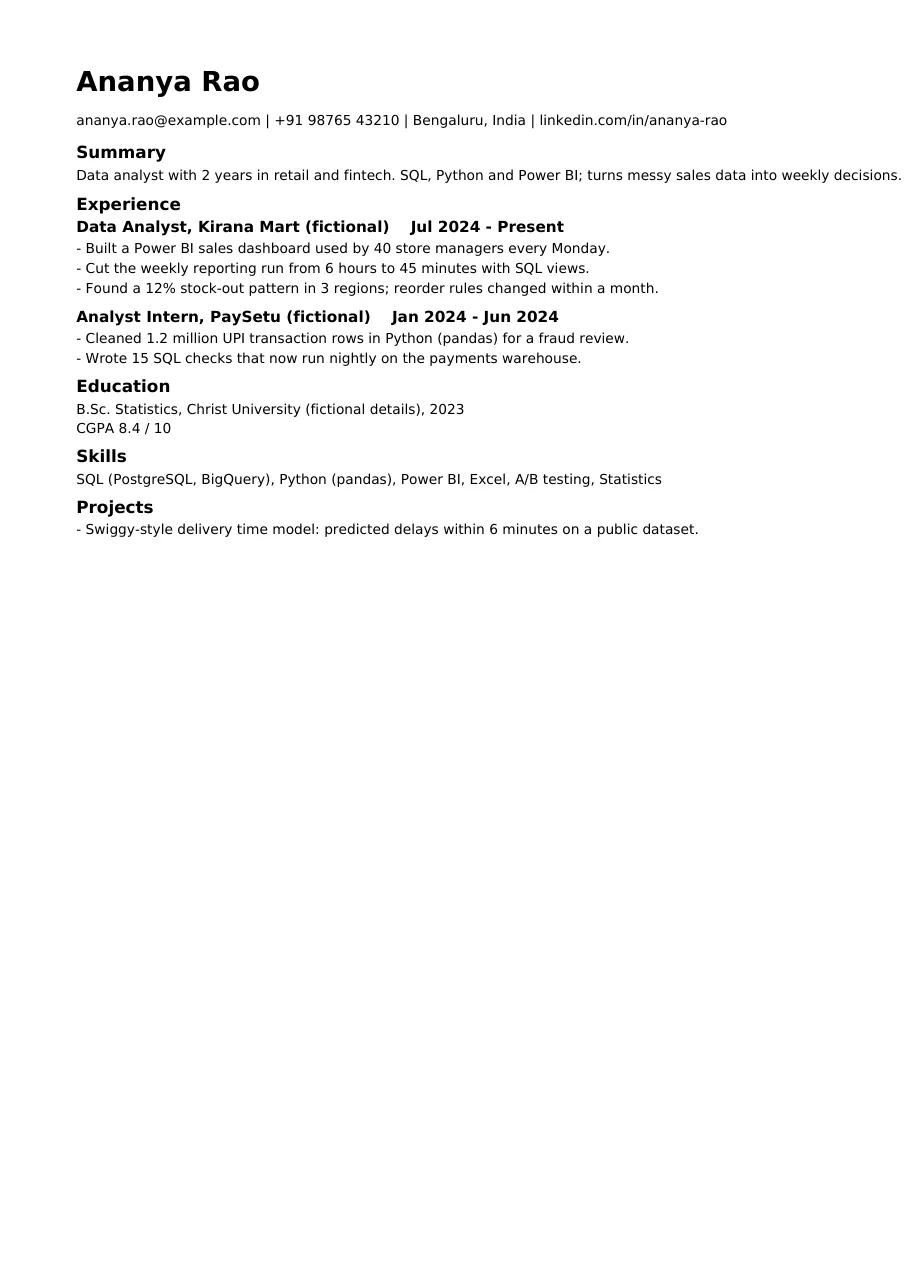
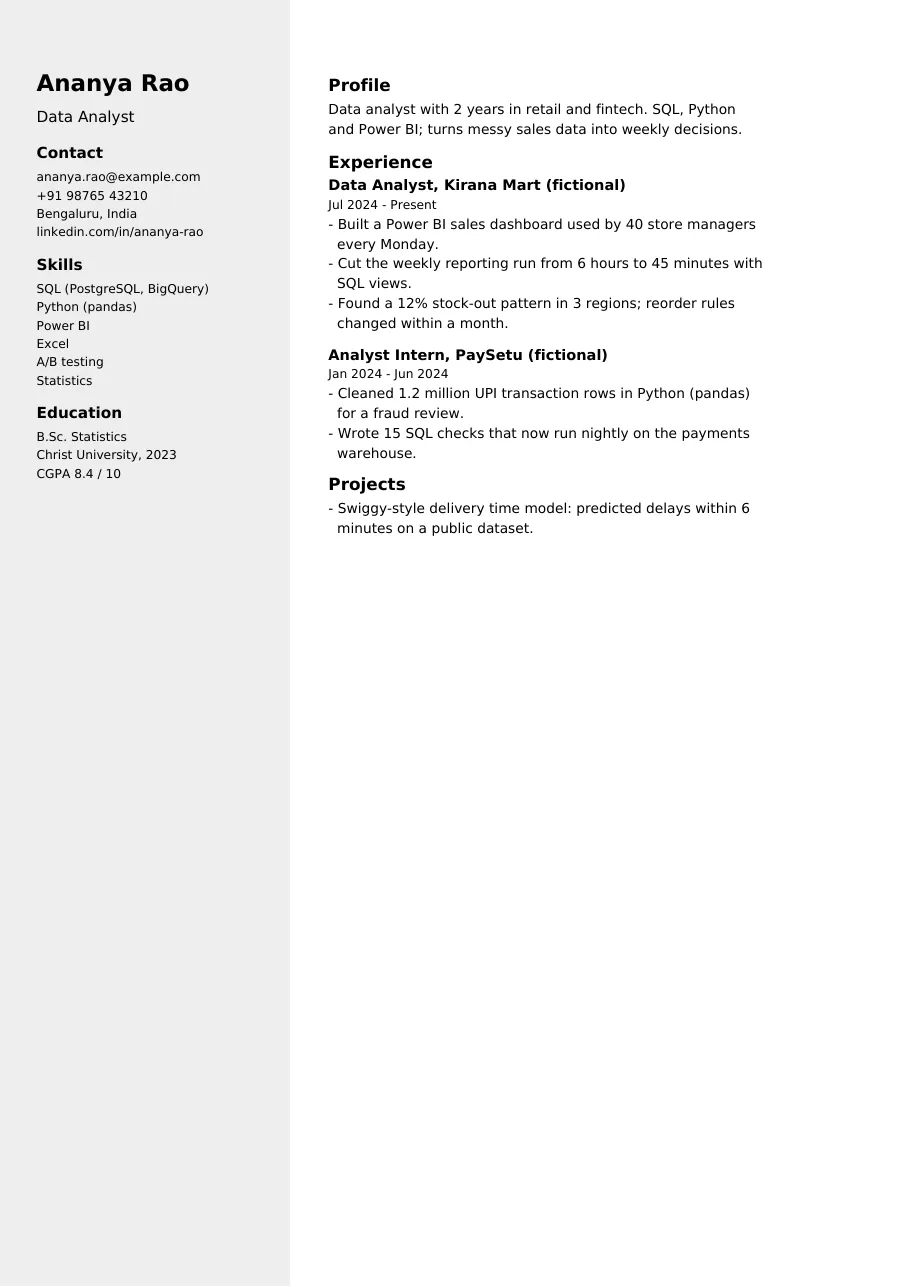
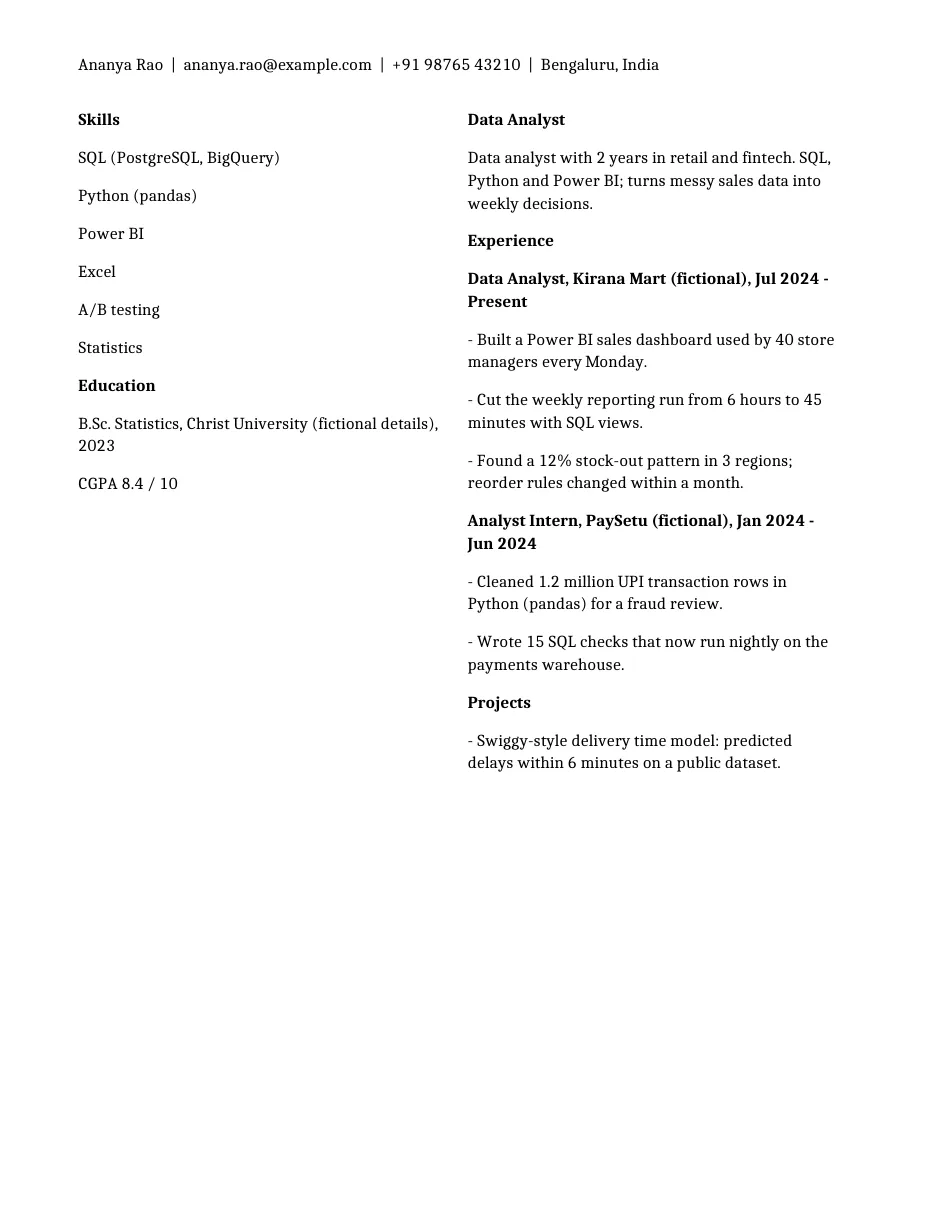
The two-column file is not broken in every system. Read in the order the file stores it, its text comes out in sensible blocks (sidebar first, then experience). Read straight across the page, which is how some parsers rebuild lines, the sidebar and the main column interleave. You cannot tell which method an employer’s system uses, which is why Greenhouse, Talview and MIT warn against columns.
How to fix each problem in the tool you used
Two columns or a sidebar
- Word
- Layout → Columns → One. If the sidebar is a table, select it → Table Layout → Convert to Text.
- Google Docs
- Format → Columns → one column. Move sidebar items into full-width sections.
- Canva / design tools
- Pick a one-column template; copy the sidebar text into sections under your experience.
Contact details in the header
- Word
- Double-click the header, cut your name and contact lines, paste them as the first lines of the page.
- Google Docs
- Same: cut from the header area and paste at the top of the body.
- Canva / design tools
- Make the name and contact lines plain text boxes at the top of the page, not part of an image.
Tables and text boxes
- Word
- Table: Convert to Text. Text box: cut the text, delete the box, paste as a paragraph.
- Google Docs
- Copy the table cells into normal paragraphs, then delete the table.
- Canva / design tools
- Avoid grid blocks for skills; write skills as one line separated by commas.
No selectable text (scan or image)
- Word
- File → Save As → PDF (not Print → Microsoft Print to PDF of a scan).
- Google Docs
- File → Download → PDF document.
- Canva / design tools
- Download as a standard PDF; leave off any option that turns text into an image or flattens it.
Icons, photos, skill bars
- Word
- Replace icons with “Email:”, “Phone:”. Delete skill-level bars; list skills as words.
- Google Docs
- Same. Images and drawings can go.
- Canva / design tools
- Remove icon elements next to contact details; keep a photo only if the job post asks.
| Problem | Word | Google Docs | Canva / design tools |
|---|---|---|---|
| Two columns or a sidebar | Layout → Columns → One. If the sidebar is a table, select it → Table Layout → Convert to Text. | Format → Columns → one column. Move sidebar items into full-width sections. | Pick a one-column template; copy the sidebar text into sections under your experience. |
| Contact details in the header | Double-click the header, cut your name and contact lines, paste them as the first lines of the page. | Same: cut from the header area and paste at the top of the body. | Make the name and contact lines plain text boxes at the top of the page, not part of an image. |
| Tables and text boxes | Table: Convert to Text. Text box: cut the text, delete the box, paste as a paragraph. | Copy the table cells into normal paragraphs, then delete the table. | Avoid grid blocks for skills; write skills as one line separated by commas. |
| No selectable text (scan or image) | File → Save As → PDF (not Print → Microsoft Print to PDF of a scan). | File → Download → PDF document. | Download as a standard PDF; leave off any option that turns text into an image or flattens it. |
| Icons, photos, skill bars | Replace icons with “Email:”, “Phone:”. Delete skill-level bars; list skills as words. | Same. Images and drawings can go. | Remove icon elements next to contact details; keep a photo only if the job post asks. |
Starting again is often faster than fixing a design template. Our one-page CV templates are single-column Word files with plain headings. Once the file reads cleanly, match its words to the job with the resume keyword checker.
A messy parse rarely gets you auto-rejected. It gets you lost.
Who rejects automatically
Knock-out questions on the application form. SmartRecruiters “will automatically reject candidates who choose answers marked as knock-out”; Oracle’s disqualification questions do the same.
What a bad parse costs
Empty or wrong fields (your phone in the address box, experience under skills) and recruiter searches that miss you, because the words are not where the search looks.
What to do
“Review the information parsed from your resume” (iCIMS) on every portal, fix the fields by hand, and answer knock-out questions truthfully.
More on how real ATS products score and filter, with the vendor pages, in our comparison of ATS resume checkers (Greenhouse, Workday, Lever, Oracle, SmartRecruiters and Ashby, and where the “75% rejected” number comes from).
Quick answers
How do I check if my resume is ATS friendly?
Look at the text a parser gets, not at the design. Drop your file in the checker above: it shows the plain text in the order your file stores it and read straight across the page, and runs up to 12 file checks. By hand: open the PDF, select all, paste into Notepad. If you cannot select the text, Lever says the document “is likely not parseable”; if the pasted lines come out jumbled, columns or tables are the usual cause.
Are two-column resumes bad for ATS?
They are risky: Greenhouse lists “Resumes that have a columned layout” as a cause of failed parses. Read across the page, our two-column sample jumps between columns 26 times in 32 lines. Some parsers handle columns well; you cannot know which one an employer uses, so one column is the safe choice.
Does an ATS reject a resume because of its format?
Rarely on its own. In the help pages we read, automatic rejection comes from knock-out questions on the application form (Greenhouse, Oracle, SmartRecruiters) and rules the employer sets, not from layout. A bad parse costs you differently: empty or wrong profile fields, and a recruiter’s keyword search that does not find you. iCIMS asks candidates to “Review the information parsed from your resume”: do that every time.
PDF or Word: which is better for ATS?
Either, if the PDF holds real text. Greenhouse accepts .doc, .docx, .pdf, .rtf and .txt; Workable accepts .pdf, .doc, .docx, .rtf, .html and .odt. The sources disagree on which is best: the University at Buffalo tells students “Use a PDF”, while Talview’s help page points to DOCX for the most reliable parsing. Follow the job posting if it names a format; otherwise a text PDF exported from Word or Google Docs is fine.
Can an ATS read my contact details in the header?
Not reliably. Greenhouse lists “Resumes with the name and contact information in the header, footer, or text box” as a cause of failed parses, and Talview advises “avoiding headers, footers, and text boxes”. Put your name, phone and email as the first lines of the page body.
Is my resume uploaded when I use this checker?
No. The file is read by code running in your browser tab (pdf.js for PDFs, served from this site, and a zip reader for .docx). Nothing is sent to a server and nothing is saved. The only thing kept is what you choose to send to the keyword checker, and that stays on your device.
What file size is too big?
Greenhouse “can’t parse resumes larger than 2.5MB”, even though it accepts uploads up to 100 MB, so a large file uploads but fills nothing in. Workable’s resume limit is 5MB. A text-only resume is usually well under 1 MB; photos and background images are what make it big.
Do icons for phone and email hurt?
They can. Icon fonts and Word’s Symbol or Wingdings characters come out as junk characters or boxes next to your details. MIT CAPD says “Avoid use of graphics, icons, or images.” Write “Email:” and “Phone:” instead.
Sources (opened 24 Nov 2026): Greenhouse: Unsuccessful resume parse; Greenhouse: Supported formats for candidate uploads; Lever: Understanding resume parsing; Workday: Concept: Resume Parsing; iCIMS: Candidate Guide to the iCIMS Talent Platform; Workable help: resume file types; Textkernel developer docs: file formats; Affinda docs: OCR; RChilli help: scanned and corrupted files; Talview: Why did my resume fail to parse; Recruiterflow: My resumes are not being parsed; HiringThing: Why some resumes won’t parse; MIT CAPD: Make your resume ATS-friendly; UB School of Management: ATS-Friendly Résumés; SmartRecruiters and Oracle knock-out rules as cited in our ATS checker comparison. Sample resumes are fictional. PDF reading uses Mozilla’s open-source pdf.js. Not affiliated with any company named here.
The resume gets read. Practise the call that comes next.
A voice interviewer runs the recruiter screen: “Walk me through your resume”, “Why this role?”, “What are your salary expectations?”, follows up on your answers and tells you what landed.
- Pick a round
PM case, consulting case, AI engineer round or a speaking coach
- Answer out loud
The interviewer follows up on what you actually said
- Read the feedback, go again
What was strong, what was thin, then a retry